Ruko U11MINI 4K RC3: The Pocket-Sized Powerhouse That Dumps Your Phone
Posted on
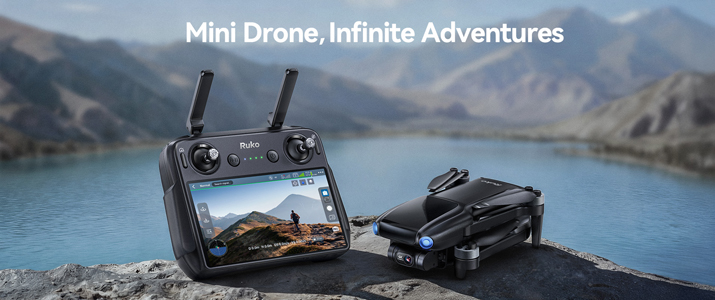
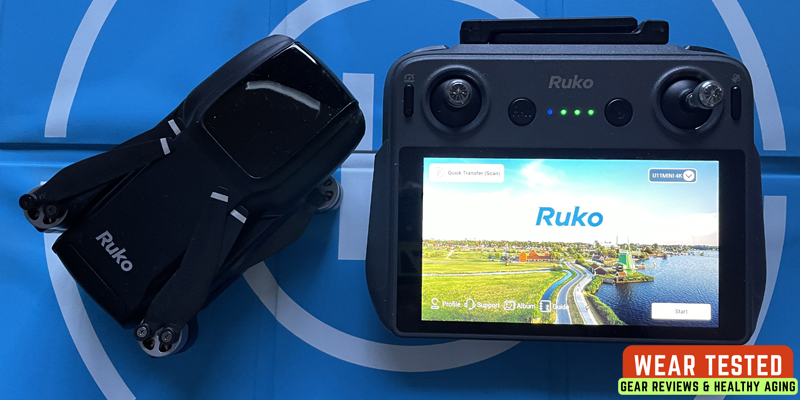
The drone market is saturated with “mini” drones, but Ruko has made a significant statement with its latest iteration: the Ruko U11MINI 4K RC3. This isn’t just a slight upgrade; it’s a re-imagining of the beginner/travel drone, primarily driven by the inclusion of the revolutionary, smartphone-free RC3 screen remote controller.
The difference between the Ruko U11MINI 4K RC3 and its previous version (the standard U11MINI 4K which we reviewed last May) is almost entirely centered around the controller and the improved reliability that comes with it.
The drone’s internal camera, stabilization, and flight specs remain largely the same high-performing package, but the user experience is drastically simplified.
What Sets the RC3 Apart: The Integrated Screen Controller
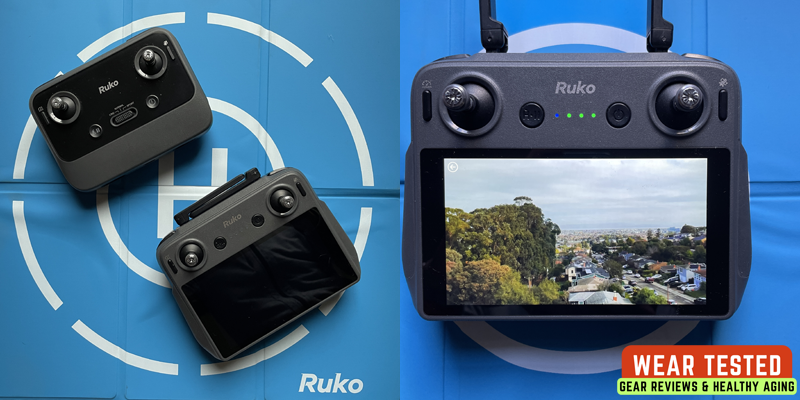
The defining feature of the U11Mini 4K RC3 is its revolutionary controller design. The RC3 features a built-in 5.5-inch Full HD touchscreen with 1920x1080p resolution, completely eliminating the need to pair a smartphone for drone operation.
Feature
RC3 (New Version)
Previous U11MINI 4K (Standard Controller)
Video Screen
Integrated 5.5-inch High-Brightness Touchscreen
Requires a Smartphone (using a clunky mount and cable)
Connectivity
Auto-Connect (dedicated processing unit)
Manual Phone Connection (Wi-Fi/cable and app needed)
Reliability
Extremely High (Dedicated screen eliminates app crashes, overheating, and phone lag)
Moderate (Relies on the stability and battery of your personal smartphone)
User Experience
Simple, Focused, Phone-Free
Clunky, Dependent on Phone, Battery-Draining
Traditional drone controllers require smartphone mounting, which introduces multiple pain points:
Battery drains on your phone during extended flights
Overheating issues in direct sunlight
App crashes and compatibility problems
Screen glare making visibility difficult
Notification interruptions during flight
The RC3 controller includes its own power supply and processing system, maintaining stable signal transmission without draining phone batteries. This design philosophy transforms the user experience from frustrating to effortless, particularly for beginners who find smartphone pairing unnecessarily complex.
The controller automatically connects on startup, meaning you can go from power-on to flight-ready in seconds rather than minutes. For spontaneous aerial photography during travel or time-sensitive shooting opportunities, this streamlined workflow becomes invaluable – particularly valuable for travel photography where lighting conditions and crowd levels can change quickly.
The RC3 controller completely removes the smartphone from the flying equation. You no longer need to worry about:
Connecting cables or mounting your phone.
Your phone battery dying during a flight.
Getting laggy video or losing the feed due to your phone’s Wi-Fi connection.
Drone Hardware: Consistency and Refinement
The core components of the drone itself are generally maintained, which is a good thing as the previous U11MINI 4K already offered strong specifications for its class:
Specification
RC3 (New Version)
Previous U11MINI 4K
Status
Camera
4K/30fps Video, 48MP Photos (8K Interpolated)
4K/30fps Video, 48MP Photos (8K Interpolated)
Same
Stabilization
3-Axis Gimbal + EIS
3-Axis Gimbal + EIS
Same
Weight
Under 250g
Under 250g
Same
Max Flight Time
Up to 64 min (Dual Battery Kit)
Up to 64 min (Dual Battery Kit)
Same
Positioning
GPS, GLONASS, Optical Flow, TOF
GPS, GLONASS, Optical Flow, TOF
Same
The focus was on taking the already capable U11MINI 4K drone and pairing it with a professional-grade controller that makes the entire process faster, more reliable, and more intuitive for beginners and travelers.
The included carrying case accommodates the drone, controller, both batteries, and all essential accessories in an organized, protected package that easily fits in carry-on luggage.
RUKO U11MINI 4K (RC3) In A Nutshell
Feature
Specification
Why it Matters
Controller
RC3 Built-in Screen
Eliminates phone connectivity issues, lag, and phone battery drain. Faster setup and more reliable flight.
Weight
<249g
Generally, FAA/CASA registration is exempt for recreational use in many regions (always check local laws!). Ultra-portable.
Camera
4K/30fps Video, 48MP Photos (8K interpolated)
High-quality image capture for a drone in this class, supported by a 1/2″ CMOS sensor.
Stabilization
3-Axis Brushless Gimbal + EIS
Produces noticeably smooth, professional-looking footage, even in windier conditions.
Max Range
20,000 ft (6,000m)
Exceptional transmission distance, giving pilots confidence for long-range shots.
Flight Time
Up to 64 min (Dual Battery Kit)
Excellent endurance for a mini drone, allowing multiple location shoots without recharging.
Cinematic on a Budget
For a drone under 250g, the U11MINI 4K punches above its weight.
Video: It reliably captures crisp 4K video at 30 frames per second. The footage is sharp and, crucially, is handled by a combination of a 3-axis mechanical gimbal and Electronic Image Stabilization (EIS). This dual-stabilization system is the real hero, delivering incredibly stable and smooth video that genuinely rivals drones costing twice as much.
Photography: The 48MP 1/2-inch CMOS sensor can produce stunningly detailed 8K still photos (achieved through pixel-binning/interpolation). While purists will debate the “true” 8K, the results are certainly sharp enough for large prints and professional-looking social media content.
The Caveat: The camera is mostly automatic. You won’t find advanced manual controls for exposure (ISO, Shutter Speed) which can lead to some over- or under-exposed shots in very challenging light. It performs best in bright, clear conditions.
Fly with Confidence
The flight experience is smooth and highly stable, making it ideal for beginners and experienced pilots alike.
Stability: A robust positioning system using GPS, GLONASS, Barometer, Optical Flow, and TOF sensors ensures rock-steady hovering. This is vital for capturing smooth cinematic shots. It maintains a Level 4-5 wind resistance, handling moderate gusts with surprising ease for its size.
Range and Endurance: The advertised 20,000-foot (6km) transmission range is impressive, though most recreational pilots will keep it much closer. The 64 minutes of total flight time (with the dual-battery kit) is exceptional for a mini drone, allowing for extended creative exploration.
Intelligent Flight Modes: The U11MINI 4K includes a suite of beginner-friendly features that make capturing complex shots easy:
Follow Me
Waypoint Flight (set a custom route)
Point of Interest (cinematic orbit shots)
Smart Return to Home (RTH): Automatically activates on low battery or signal loss, a crucial safety feature.
Customization Buttons
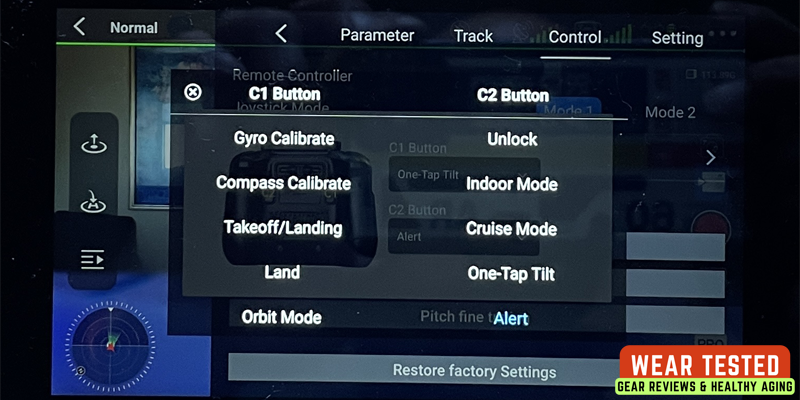
The Ruko U11MINI 4K (RC3) features two physical buttons on the back of the controller labeled C1 and C2. These are “Custom Shortcut” buttons designed to give you quick access to flight or camera features without digging through the touchscreen menus.
What the Customization Buttons Do
By default, these buttons are often unassigned or set to common gimbal actions. The RC3 C1 button is by default set to “One-Tap Tilt” (one-key slow smooth camera adjustment) and C2 button to “Alert” (turn drone buzzer on). Pressing the buttons again will reset the drone setting’s back.
How to Set Up Customization Buttons
Because the RC3 has an integrated screen, you don’t need a phone. You configure the buttons directly through the controller’s interface:
Enter Camera View: Power on both the drone and the controller and wait for the live video feed to appear.
Open Settings: Tap the three dots (…) in the top-right corner of the screen to enter the main settings menu.
Go to Control Tab: Select the Control (joystick icon) tab on the left sidebar.
Find Button Customization: Scroll down until you see “Custom Buttons”.
Assign Functions: You will see a dropdown menu for both C1 and C2. Tap the dropdown and select the specific action you want each button to perform.
Exit & Test: Tap back into the flight screen. Press the buttons on the back of the remote to ensure they trigger the correct actions.
You can transfer logs, photos, and videos from the remote controller to your phone via the Ruko U11 mobile app. Ruko has introduced a wireless “QR Code” method designed to keep the process fast and cable-free.
Transferring Photos and Videos (Wireless QR Method)
Since the RC3 is a standalone Android-based device, it can generate a local hotspot to “beam” files to your phone.
On the Remote Controller (RC3):
Tap the Album icon on the home screen.
Select the photos or videos you want to transfer.
Tap the Transfer icon (“lightning” icon in upper right corner). A QR Code will appear on the RC3 screen.
On Your Phone:
Open the Ruko U11 app.
Tap “Quick Transfer (Scan)” in the upper left corner.
Scan the QR code displayed on the remote controller using your phone camera.
Your phone will prompt you to join the controller’s private Wi-Fi network. Once connected, the videos & photos will download directly into your phone’s gallery/app album.
Transferring Flight Logs
On the Remote Controller (RC3):
You can view your flight history by going to Profile > Log File.
Select the files you’re interested in and tap to open it.
Tap the Transfer icon (“lightning” icon in upper right corner). A QR Code will appear on the RC3 screen.
On Your Phone:
Open the Ruko U11 app.
Tap “Quick Transfer (Scan)” in the upper left corner.
Scan the QR code displayed on the remote controller using your phone camera.
Your phone will prompt you to join the controller’s private Wi-Fi network. Once connected, the log files will download directly into your phone’s gallery/app album.
Pro Tip:
For the full 4K quality, it is always best to remove the microSD card from the drone itself and plug it into your phone or computer using a card reader.
The remote controller has its own SD card slot primarily for screen recordings of your flight interface. If you want to transfer a screen recording you made of your flight, you can move that SD card to your phone.
The Final Verdict
The Ruko U11MINI 4K RC3 sets a new standard for the beginner-to-intermediate drone category.
Content creators needing professional-looking footage on accessible budgets
Beginners frustrated by smartphone-dependent drone controllers
Users prioritizing convenience and reliability over absolute performance
The RC3 controller is revolutionary, the 4K/30fps video is genuinely stable, and the combined features are an incredible value for the price.
Our verdict is clear: The Ruko U11MINI 4K RC3 is one of the best value-for-money drones on the market. It delivers professional-looking results without the high cost and complexity often associated with premium brands.